How to Cut Claims Processing Time Without Replacing Your Core System
Most mid-market insurers lose 5-10 days per claim to manual work that happens outside their core system. Here's how to fix it without replacing Applied Epic or Majesco.

Most mid-market insurance companies and TPAs lose 5-10 days per claim to work that happens outside their core system: chasing documents over email, manually routing claims to adjusters, and copy-pasting data between screens. You don't need to replace Applied Epic or Majesco to fix this. You need to automate the shadow workflow that lives in your inbox, your spreadsheets, and your phone.
You can cut your claims cycle time significantly without a core system replacement. The bottleneck is not your software. It is the manual work that surrounds it.
Claims adjusters at mid-market TPAs and insurance administrators spend a meaningful share of their day on tasks that have nothing to do with adjudicating claims: following up on missing documents, re-entering data that already exists somewhere else, forwarding emails to the right person, and updating spreadsheets that track what the system cannot. That work is invisible in your dashboard, but it shows up in your cycle times, your adjuster headcount, and your error rate.
The fix is not a rip-and-replace. It is a thin automation layer that sits between your existing tools and handles the handoffs your team currently does by hand.
Where Your Claims Time Actually Goes
The J.D. Power 2024 U.S. Auto Claims Satisfaction Study found an average repair cycle time of 22.3 days for auto claims. Property claims run longer. But the processing time inside your operation, from first notice of loss (FNOL) to adjuster assignment to payment, is a separate problem, and it is one you control.
The Bureau of Labor Statistics counted 358,307 claims adjusters, examiners, and investigators employed in the U.S. in 2023, earning an average of $71,610 per year. The question is what percentage of their time goes toward work that automation could handle.
At most mid-market operations, the honest answer is 30 to 50 percent.
The work that eats your cycle time is not the hard work. It is the connective tissue: the email asking for a police report, the Slack message to find out which adjuster has capacity, the copy-paste from the claimant's email into your system of record. None of it requires a licensed adjuster. All of it takes time.
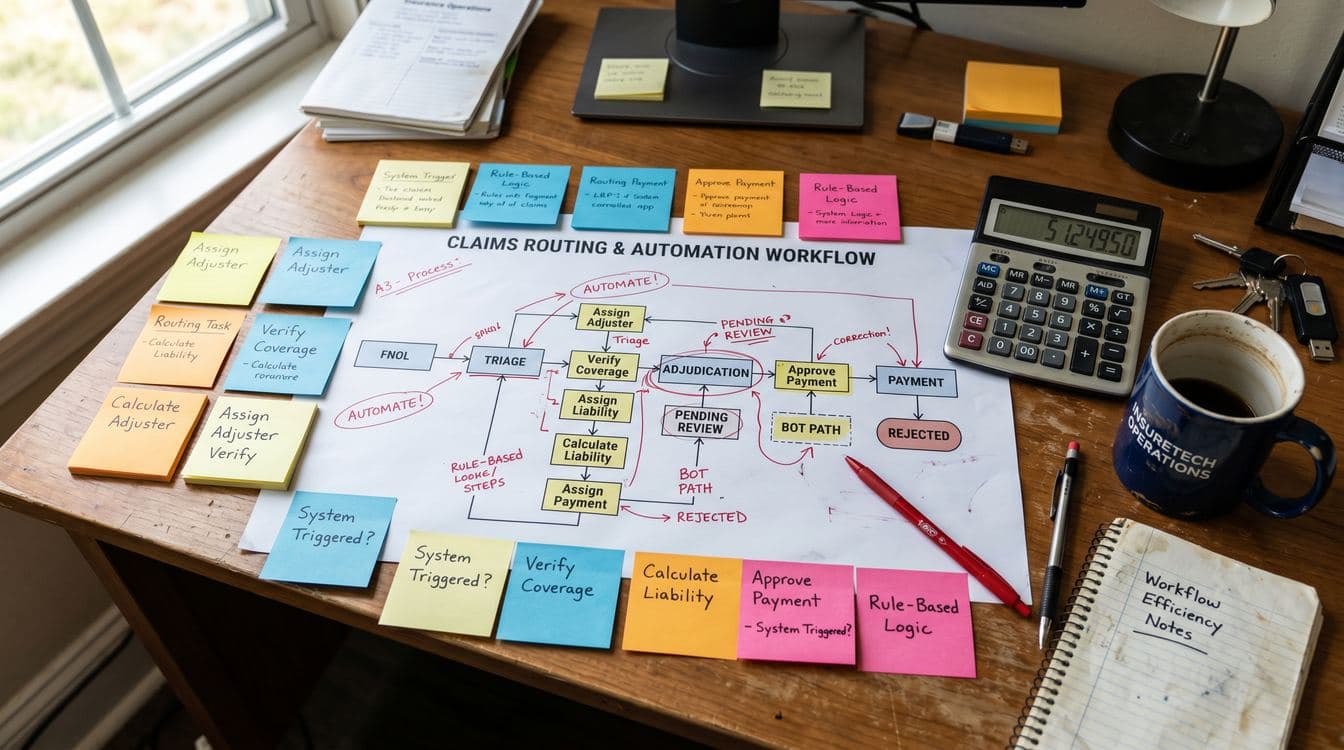
The Five Manual Steps That Eat Your Claims Clock
1. Document chasing
A claim comes in. The FNOL is logged. Then nothing happens for two or three days while someone waits for the police report, the medical records, or the photos of the damage. That wait is not passive. It requires follow-up, tracking, and re-follow-up. In most operations this happens over email, with no automated reminders and no visibility into whether the request was ever received.
2. Manual routing
Once documents arrive, a supervisor or lead adjuster looks at the claim, looks at the queue, and decides who gets it. This sounds simple. It is not. Adjuster specialization, current workload, jurisdiction rules, and claim complexity all factor in. When caseloads exceed around 110 claims per adjuster, research from industry consultants including Deloitte suggests costs per claim rise by as much as 20 percent due to errors, leakage, and slower cycle times. Most mid-market operations have no automated way to enforce caseload limits.
3. Data re-entry
Your claimant fills out a form. Someone reads the form and types the data into your system. Your system already has the policy data. Someone reads that policy data and types parts of it into a different screen or spreadsheet. None of this adds information. It just moves it from one place to another while introducing the chance for error.
The American Medical Association documented a 19.3 percent claims error rate tied largely to manual data handling in health insurance. The dynamics are similar in P&C and workers' comp: when humans transcribe data, errors follow.
4. Status communication
Claimants call to ask where their claim stands. Adjusters spend time on calls they did not schedule, answering questions the system could answer automatically. At larger operations this drives inbound call volume high enough to require a dedicated customer service team. At mid-market scale it falls on adjusters, which means you are paying adjuster rates for work that a phone tree or automated email could handle.
5. Exception handling without a clear path
A claim comes in that does not match the standard workflow. Maybe it involves a subrogation question, or a coverage dispute, or a vendor outside your preferred network. The adjuster does not know where to route it. They ask around. Time passes. The claim sits.
In most operations, exception routing is 100 percent manual and 0 percent documented. That means every exception takes as long as the slowest person who handles it.
How to Build an Automation Layer That Works Alongside Your Existing System
The core idea is simple: you are not replacing Applied Epic, Majesco, or whatever core system you run. You are building a coordination layer that handles the work that happens around it.
This is sometimes called a workflow orchestration layer or an integration middleware. The tools vary (Zapier, Make, n8n, and purpose-built insurance workflow platforms all compete here), but the architecture is the same: trigger on an event, pull or push data, route to the right person or system, confirm completion, move to the next step.
Here is what that looks like in practice for each of the five problem areas above.
Document requests become automated reminders. When a claim is logged without a required document, the system sends a request automatically. If it goes unanswered after 48 hours, it sends a follow-up. After 72 hours, it flags the claim for adjuster review. Your adjusters never have to think about it until human judgment is actually needed.
Routing becomes rule-based. You document your routing logic (which you already have in someone's head) and encode it. Complexity tier, claim type, jurisdiction, and adjuster caseload become variables the system evaluates automatically. The adjuster who gets the assignment gets it in their queue, not their email.
Data re-entry becomes field mapping. Your intake form writes directly to your core system. Your core system pushes policy data to your claims form. The integration work is real, but it is a one-time build, not a daily labor cost.
Status updates become outbound automation. When a claim status changes in your system, an email or text goes to the claimant automatically. You can configure the triggers, the message content, and the conditions. Inbound calls drop because claimants already know what is happening.
Exception handling gets a defined path. You cannot automate exceptions, but you can route them consistently. When a claim fails to match any standard rule, it goes to a specific queue, assigned to a specific senior adjuster, with a flag that tells them why it landed there.
None of this requires replacing your core system. It requires building clean connections to it.
"We thought we needed new software. What we actually needed was for the software we had to talk to each other." A regional TPA operations lead, describing the year before they built a workflow layer.
If you want to understand how other operators have thought through the build-vs-buy question on automation tooling, the post on evaluating AI vendors without a CTO covers the framework in detail.

What This Costs and What It Returns
McKinsey's analysis of insurance claims automation puts the potential cost reduction from automation at 25 to 30 percent of loss adjustment expenses. For a TPA processing $50M in claims annually, that is a material number.
At mid-market scale, the math is more modest but still significant. Consider a 10-person claims team with an average loaded cost of $85,000 per adjuster per year. If 35 percent of their time goes to manual coordination work that automation could handle, you are spending roughly $300,000 per year on tasks that a workflow layer could do for a fraction of that.
The build cost for a workflow automation layer depends on how complex your integrations are and whether you use a platform or build custom. A realistic range for a mid-market TPA is $40,000 to $120,000 in one-time implementation, with ongoing platform costs of $10,000 to $30,000 per year. Most operations see payback in 12 to 18 months through adjuster time recovered, faster cycle times, and reduced errors.
The secondary benefit is capacity. Automating coordination work means your adjusters can handle more claims without adding headcount, or handle the same volume with more attention to quality. The BLS projects a 5 percent decline in claims adjuster employment over the next decade as automation handles routine tasks. Building that capacity now puts you ahead rather than scrambling to catch up.
Where to Start
The mistake most operations make is trying to automate everything at once. That leads to long timelines, change management problems, and a team that feels threatened rather than supported.
Start with the one manual step that costs you the most time. For most mid-market TPAs, that is document collection. It is high-volume, low-complexity, and immediately measurable. Build and deploy an automated document request and reminder workflow, measure the time saved, and use that evidence to fund the next phase.
The typical sequence: document automation first, then routing rules, then status communications, then data integrations, then exception handling. Each step builds on the last.
One note before you build anything: document what your current process actually is, not what your procedures manual says it is. Shadow workflows accumulate over years. If you automate a process nobody actually follows, you will spend money automating the wrong thing. Spend a week mapping how claims move through your operation today.
If you have senior people who carry the institutional knowledge of how claims get routed and how exceptions get handled, do not let that knowledge stay in their heads. The post on capturing tribal knowledge before key people leave is directly relevant here.
FAQ
Does this approach work with Applied Epic or Majesco specifically?
Yes, though integration complexity varies. Applied Epic has a documented API and a marketplace of integration partners. Majesco's Claims product also supports API connections. The key question is whether your implementation has API access enabled and what data fields are exposed. Older versions may require middleware or extract-based integrations rather than real-time API calls, but that changes the architecture, not the overall approach.
How long does it take to build a basic workflow automation layer?
A document collection and routing automation for a mid-market TPA typically takes 6 to 12 weeks from requirements to deployment, assuming you have clear routing rules documented and a developer or implementation partner who knows your core system. The more complex your exception handling, the longer it takes. Start narrow and expand.
Will adjusters push back on automated routing?
Some will. The key is framing: automation handles the work they find most tedious (chasing documents, routing decisions, status calls), not the work they were hired for (coverage analysis, negotiations, complex liability). In practice, most adjusters prefer the version where their queue is organized and they are not spending half the day on administrative follow-up.
What happens when the automation fails or a claim falls through the cracks?
Every workflow layer needs exception handling and monitoring. You should configure alerts for claims that have not moved in a defined period, and you should have a fallback queue for claims that no rule matches. The goal is not to eliminate human oversight. It is to reduce the routine volume so your humans have capacity to catch the exceptions.
Can a TPA do this without a dedicated IT team?
Yes, with the right platform choice. Tools like Make or n8n are manageable for an operations-minded person with some technical comfort, especially for the early-stage document and routing automations. More complex integrations, particularly those that write data back to your core system, typically require a developer or an implementation partner. If you do not have internal IT, budget for a partner rather than trying to DIY complex integrations.
If you want to walk through what this would look like for your specific operation, Granular works with mid-market insurance admins and TPAs on exactly this kind of workflow build. Book a discovery call and bring your current process map. We will tell you what is automatable, what is not, and what order to build in.
Keep Reading
- How to Capture Tribal Knowledge Before Key People Leave -- The institutional knowledge that lives in senior adjusters' heads is the same knowledge you need to encode into routing rules and exception workflows before you can automate anything.
- How to Evaluate AI Vendors When You Don't Have a CTO -- A practical framework for assessing automation and AI vendors when you do not have a technical executive in the room to ask the hard questions.